6.7. DataFrame At
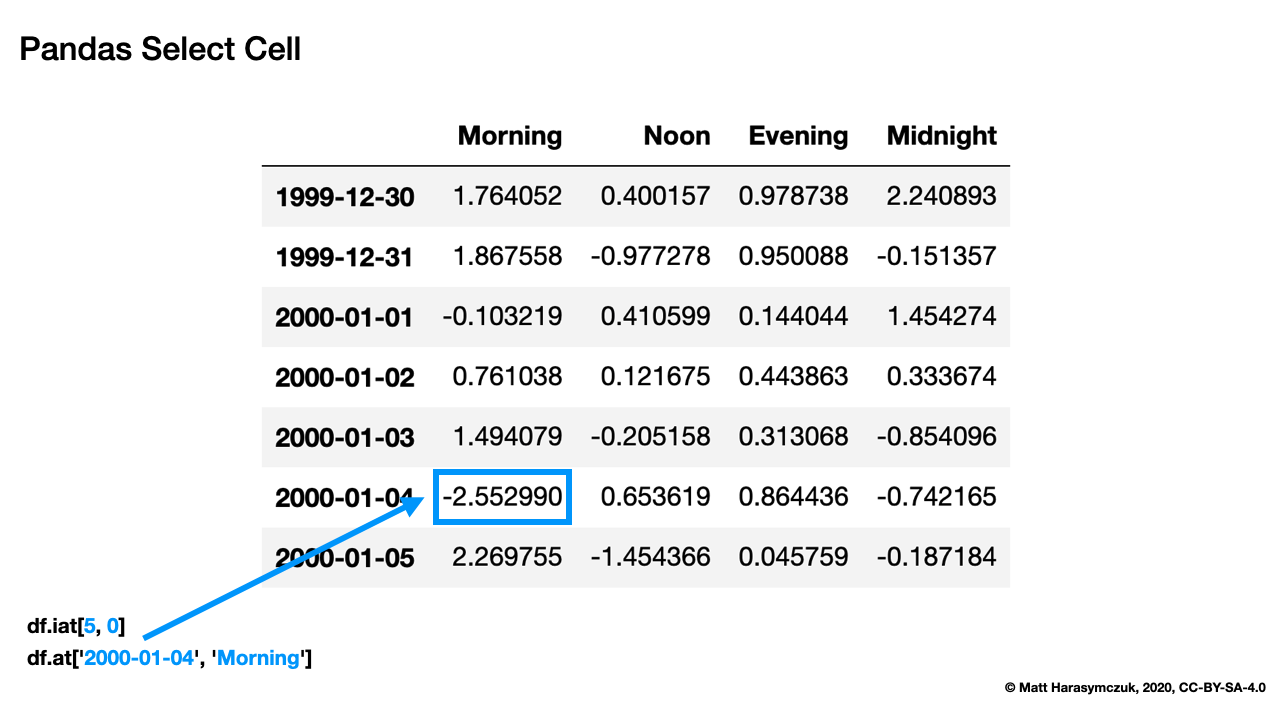
.at[row, col]- Indexing by label.iat[row, col]- Indexing by positionAccess a single value for a row/column pair by integer position
Use iat if you need to get or set a single value in a DataFrame
Pandas Select Cell:
6.7.1. SetUp
>>> import pandas as pd
>>>
>>> df = pd.DataFrame([
...     {'firstname': 'Alice', 'lastname': 'Apricot', 'age': 30},
...     {'firstname': 'Bob', 'lastname': 'Blackthorn', 'age': 31},
...     {'firstname': 'Carol', 'lastname': 'Corn', 'age': 32},
... ], index=['a', 'b', 'c'])
>>> df
  firstname    lastname  age
a     Alice     Apricot   30
b       Bob  Blackthorn   31
c     Carol        Corn   32
6.7.2. .iat[]
DataFrame.iat[row, col]- Indexing by positionDoes not support fancy indexing
Start included
Stop excluded
>>> df.iat[0,0]
'Alice'
>>>
>>> df.iat[0,1]
'Apricot'
>>> df.iat[1,0]
'Bob'
>>>
>>> df.iat[1,1]
'Blackthorn'
6.7.3. .at[]
DataFrame.at[row, col]- Indexing by labelSupports fancy indexing
Start included
Stop included
>>> df.at['a', 'firstname']
'Alice'
>>>
>>> df.at['a', 'lastname']
'Apricot'
>>> df.at['b', 'firstname']
'Bob'
>>>
>>> df.at['b', 'lastname']
'Blackthorn'